

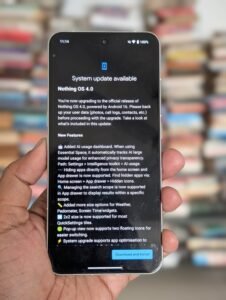
Nothing OS 4.0 Android 16: Nothing has officially launched Nothing OS 4.0, built on Android 16, bringing a refined experience with sharper design, smarter AI tools, and meaningful usability improvements. Here’s a detailed look into what the update offers, its highlights, and why it matters.
Design & User Experience: The “Flow” Vision
One of the most striking aspects of Nothing OS 4.0 is its visual refinement. Dubbed the “Flow” design, the UI now feels more consistent, fluid, and natural. Animations have been reworked for smoother transitions, touch responses feel more precise, and the entire system aims to reduce visual clutter.
Quick Settings have also received a revamp. The new layout introduces a 2 × 2 grid for tiles, making the toggle panel more compact and easier to navigate.
Additionally, the lock screen has been spruced up with new clock styles, giving users more personalization options.
Extra Dark Mode: Deep Black, Better Efficiency:
One of the standout visual features of Nothing OS 4.0 is the Extra Dark Mode. Unlike a typical dark theme, this mode delivers “true black” backgrounds, increasing contrast and making it gentler on the eyes in low light.
Beyond aesthetics, this mode also aims to improve power efficiency – especially on OLED displays – by reducing the display’s energy consumption.
Multitasking Upgraded: Pop-up View with Two Windows
Multitasking becomes significantly more powerful in OS 4.0. The Pop-up View now supports two floating app windows, allowing users to work with two small app windows simultaneously.
Navigating between these windows is made easy: swipe up from the bottom to minimize, or pull down to expand back to full-screen.
This improves productivity – for example, you can chat in one window while referencing a document in another, without constantly switching apps.
Nothing OS 4.0 is here! 🚀 Built on Android 16, it brings smarter AI tools, smoother multitasking with dual pop-ups, Extra Dark Mode, a cinematic camera ‘Stretch’ preset and refined design. #NothingOS4
pic.twitter.com/RYFvdJIB4A— Surendra (@drsurendrajar) November 21, 2025
AI Transparency: The AI Usage Dashboard
A major highlight of this update is the AI Usage Dashboard, a tool designed to give users more insight into when their phone is using large language models (LLMs).
This dashboard lives under the “Intelligence toolkit” in Essential Space, helping users understand and monitor AI activity – whether something is listening, processing, or generating.
This transparency is crucial in an era where AI is increasingly embedded in smartphone tasks, and Nothing seems to emphasize user control rather than hiding AI in the background.
Essential Apps & Playground: Creativity Meets Utility
Nothing OS 4.0 introduces a new concept called Essential Apps, which are AI-powered mini-apps or widgets. Using Playground – a creative hub – users can describe what they want, and the system generates a widget accordingly.
These widgets are not just for fun: they are functional tools that live on your home screen. The idea is to let users tailor their phone in a highly personalized way.
In terms of capacity, the Phone 3 supports up to six Essential Apps, while other supported Nothing devices are limited to two.
All these user-created apps live in a structured Widget Drawer, making it easier to manage and reuse them.
Glyph Interface: Smarter, Interactive, More Useful
True to Nothing’s identity, the Glyph interface gets some meaningful upgrades:
-
Live Updates via Glyph: Android 16’s Live Updates feature is now integrated with the Glyph lights on compatible Nothing phones, allowing you to see real-time statuses (like deliveries, ride progress, or timer) on the back of the phone.
-
Flip to Glyph: On Phone 3, you can now set what happens when you flip the device – say, switching between vibrate or silent mode depending on your preference.
-
Pocket Mode: The Glyph matrix can detect when the phone is in your pocket and turn off to avoid accidental activations.
-
New Glyph Toys: Fun and decorative elements like an hourglass (showing time passage) or a lunar cycle (to indicate moon position) bring personality to the back interface.
-
Glyph Mirror Selfie: On the Phone 3, you can take a mirrored selfie using the Glyph interface, and the OS now saves both the mirrored and the original versions in your gallery.
Camera & Gallery Enhancements:
Nothing OS 4.0 enhances its photography experience with new tools and creative presets:
-
Stretch Camera Preset: Developed in collaboration with photographer Jordan Hemingway, this preset emphasizes deep shadows and extended highlights to give photos a cinematic, stylized look.
-
TrueLens Engine: This engine boosts camera and gallery performance, making photo processing smoother and more visually rich.
Meanwhile, the Gallery app becomes more intuitive and may integrate subtle AI features for better photo management.
System Performance & Optimization:
Under the hood, Nothing OS 4.0 brings optimizations to make the system faster, more stable, and responsive:
-
App Optimization: A new system-level optimization tool helps apps launch and resume faster.
-
Better Connectivity: Improvements in Bluetooth and Wi-Fi stability ensure fewer dropouts and smoother connections.
-
Battery & Brightness Handling: The OS fine-tunes how brightness is managed across contexts, and volume control now gives gentle haptic feedback when you reach its limits.
Privacy & Customization Upgrades:
-
Hide Apps: You can now hide apps directly from the home screen or App Drawer, helping you declutter your digital space.
-
Search Scope Control: In the app drawer, you can choose to limit what the search reveals, making it easier to find relevant content.
-
Lock Screen Personalization: Two new clock designs and blur effects on the password/lock screen pages give more visual options.
Rollout & Device Support:
-
The stable rollout of Nothing OS 4.0 started on 21 November 2025, beginning with the Nothing Phone (3).
-
The update will gradually reach other Nothing devices and CMF models, according to Nothing’s roadmap.
-
Earlier, an open beta was made available for a range of models including Phone (3), Phone (2), Phone (2a), and Phone (2a) Plus.
Possible Drawbacks & Community Feedback:
While the update brings many improvements, some users have raised concerns:
-
A few beta users report battery optimization issues, claiming that their phones now drain faster.
-
There are reports of bugs, including frequent notifications from system services.
-
Some users feel that the update is underwhelming, saying the changes are not as dramatic as expected.
These criticisms are typical of early-stage OS upgrades, especially when they transition into stable builds.
Why It Matters:
Nothing OS 4.0 is more than just “another Android update.” It combines minimalistic design with intelligent tools and AI transparency, which positions it as a thoughtful OS rather than just a flashy one. Here are a few reasons why this update is significant:
-
Balanced Innovation: It doesn’t just add features for the sake of it — the update refines existing elements (like Glyph and animations) while introducing useful AI tools.
-
User Control: With the AI dashboard and app-hiding options, Nothing is giving users more control over how their device behaves.
-
Creative Power: Essential Apps via Playground is a bold move: it empowers users to co-create with the OS, blending personalization with AI.
-
Battery Efficiency: Extra Dark Mode and optimizations aim to improve real-world usability, especially for users who use their phones heavily at night or rely on OLED displays.
Nothing OS 4.0, based on Android 16, marks a meaningful evolution for Nothing’s software. It’s not about flashy gimmicks – it’s about refined design, smarter multitasking, and giving users more control over AI. Whether you’re a Nothing Phone (3) user or planning to get one soon, OS 4.0 offers a compelling mix of aesthetics, innovation, and usability.
ऐसे और भी Technology टॉपिक के ऊपर लेखों के लिए हमारे साथ जुड़े रहें! Khabari bandhu पर पढ़ें देश-दुनिया की ताज़ा ख़बरें — बिज़नेस, एजुकेशन, मनोरंजन, धर्म, क्रिकेट, राशिफल और भी बहुत कुछ।
1 thought on “Nothing OS 4.0 Android 16: A Deep Dive into the New Update”