

Apple Rolls Out iOS 26 Beta 6: Apple has just released the sixth developer beta of iOS 26, marking another step towards the much-anticipated public release expected in September 2025. While the new update doesn’t introduce a complete overhaul, it brings several subtle yet significant improvements — including new ringtones, interface tweaks, camera app refinements, and a deeper look at Apple’s futuristic “Liquid Glass” design.
If you’ve been following the iOS 26 beta journey so far, this release feels like a fine-tuning session before the grand reveal. It’s not about adding a long list of new features, but rather perfecting what’s already there and polishing the user experience.
Six New Ringtones for a Fresh Sound Experience
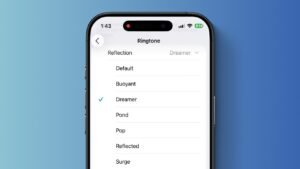
One of the first things you’ll notice in iOS 26 Beta 6 is the addition of six fresh ringtones. These aren’t entirely new compositions but rather creative variations of Apple’s iconic “Reflection” tone — which has been the default since the iPhone X era.
Early testers on social media have been particularly impressed by one called “Dreamer”, describing it as “soft yet uplifting” and a perfect wake-up alarm for mornings. Apple’s strategy here seems clear: offer users subtle variety while keeping the familiar Apple aesthetic intact.
It’s a small change, but it adds a touch of personalization for those who have grown tired of hearing the same tones for years. Considering that ringtones are one of the most-used audio elements in a phone, these additions will likely be a crowd-pleaser.
Camera App Swipe Direction — Back to the Classic Way
Apple made waves earlier in the iOS 26 beta cycle when it changed the swipe direction for switching between camera modes. While seemingly minor, this tweak sparked an unexpected uproar among users — many of whom had developed muscle memory for the original gesture over years of use.
In Beta 5, Apple tried to compromise by adding a “Classic Mode” toggle in Settings, allowing users to choose their preferred swipe direction. But now, in Beta 6, that toggle has disappeared entirely. Instead, Apple has reverted the swipe direction back to the way it has always been.
This is a rare example of Apple quickly responding to user feedback mid-beta, signaling that the company still listens closely to its community — especially when a change impacts daily usability.
Liquid Glass Design Gets More Depth
The “Liquid Glass” design language, first introduced in early iOS 26 builds, continues to evolve. This translucent, color-shifting interface element creates a dynamic look across system apps, widgets, and toggles, adapting fluidly to background colors.
In Beta 6, the dispersion effect — the way colors ripple and refract as you interact — feels more refined. Tab navigation animations are smoother, and Lock Screen widgets now appear to “float” more naturally against the background.
The Liquid Glass design isn’t just about aesthetics; it’s part of Apple’s broader push towards creating a more immersive, cohesive interface that feels alive in your hand. With this polish, it’s becoming one of iOS 26’s most visually striking upgrades.
Interface Transitions Are Now Faster and Smoother
Apple has long focused on making iOS feel responsive, but Beta 6 takes it a step further. App open/close animations are noticeably quicker, with a subtle elasticity that gives the interface a modern touch.
These micro-animations might seem like small details, but they directly influence how “fast” a phone feels. Many testers have noted that this build feels more stable and fluid than previous ones, even though it’s still technically pre-release software.
Redesigned Onboarding Experience
If you’re installing iOS 26 for the first time, you’ll now be greeted with a revamped onboarding sequence. This guided walkthrough introduces you to the new icons, interface changes, and Liquid Glass effects, ensuring you’re not left wondering what’s different.
It’s a small yet thoughtful addition that helps users — especially those who skip betas — feel at home with the new design language before they even start exploring.

Bug Fixes and Stability Gains
As with most late-stage betas, this release focuses heavily on stability. Early feedback suggests fewer crashes, better battery performance, and improved touch responsiveness.
Developers testing the build have also reported:
- Fewer visual glitches when switching between apps.
- More consistent Face ID performance in low light.
- Improved compatibility with third-party apps that previously crashed under iOS 26 betas.
While it’s still not recommended for your primary device unless you’re comfortable with occasional bugs, this is easily the most stable iOS 26 beta so far.
Looking Ahead — Public Beta and Final Release
The public beta of iOS 26 will soon receive these same updates, likely within a week or two. Apple is expected to officially unveil the final version in September 2025, alongside the iPhone 17 lineup.
The timeline mirrors Apple’s traditional release cycle, where late July and early August betas focus on refinement rather than major new features. By the time the September event arrives, the software will be close to polished perfection.
Extra Features Rumored for the Final Release
While Beta 6 doesn’t bring anything groundbreaking, there are whispers in the developer community about possible last-minute surprises in the final build:
- More Liquid Glass customization — including optional color themes.
- A new Control Center layout — hinted at in earlier code references.
- Updated Siri interface — with smaller, more contextual pop-ups instead of the full-screen takeover.
Apple is known for keeping a few features under wraps until the keynote, so it wouldn’t be surprising if the final iOS 26 release has a few tricks left to reveal.
Why iOS 26 Matters for Everyday Users
For some, the changes in Beta 6 might seem minor. But for everyday users, these refinements — smoother animations, better design language, and improved personalization — add up to a noticeably better experience.
Apple’s approach this year is less about flashy features and more about making the OS feel beautiful, consistent, and intuitive. This could be a smart move, especially as users hold onto their iPhones longer and prioritize smooth day-to-day use over headline-grabbing gimmicks.
The iOS 26 Beta 6 is a solid step forward — polishing the interface, responding to user feedback, and showcasing the continued evolution of Apple’s Liquid Glass design. While we’re still weeks away from the final release, this update feels like Apple fine-tuning the details that make iOS the gold standard in smartphone operating systems.
If you’re a developer or adventurous user already running the beta, this build is well worth the update. And if you’re waiting for the public release, September is looking more exciting than ever.
ऐसे और भी Technology टॉपिक के ऊपर लेखों के लिए हमारे साथ जुड़े रहें! Khabari bandhu पर पढ़ें देश-दुनिया की ताज़ा ख़बरें — बिज़नेस, एजुकेशन, मनोरंजन, धर्म, क्रिकेट, राशिफल और भी बहुत कुछ।